Friday, September 13, 2013

How I Spent Flipped Day

Probably by coincidence, our school's Online & Blended Learning Committee presented their findings on Flipped day. Knowing that I flipped my class, I was asked to participate in the presentation. 
Here's the basic outline of my presentation, minus some things I mentioned on the spot. The beginning of my talk was greatly inspired by Amanda Meyer, who blogs about a presentation she recently gave. Since then, I've adopted this message and shared it with my students on the first day of class.

"Stand up if you agree with the following statements. 
  • You want your students to engage in critical thinking.
  • There are times where you need to give direct instruction - explain a concept, demonstrate how to do something, give information or instructions.
  • Some students instantly understand while others do not.
  • Some students need to hear or see things at a slower pace than others.
  • Some students need to hear or see things multiple times to get it.
  • Some students pay attention during direct instruction and some do not.
  • Some students are absent when you give direct instruction.
  • Some students need and/or request your help outside of class time.
  • Some students are reluctant to request help.
  • Some students do not complete their homework because they are genuinely confused. (Some expected chuckles here.) 
  • Some students would benefit from your presence during those times.
  • Some students get inappropriate help during those times.
Keep your responses in mind when viewing the next clip.


So I was faced with an important question, what is the best use of my class face-to-face time. Is it me delivering information to my students or is it working with my students?
I decided the second option was the best way to spend class time and that's what led me to flip my class. "

I went on to explain what I did during my first flipped class attempt, which was 4th quarter of last year. I provided tangible examples of how flipping improved my class and how I plan to enthusiastically build on my progress this year. I mentioned how a previous presentation on digestion took about a class period and a half in previous years and how the video turned out to be only 10 minutes. This recovered time was spent answering questions, letting students spend more time on designing experiments, even revising experimental designs and collecting data. I answered questions and grabbed a few students who struggled and did small group instruction at the board.

There were thoughtful questions and issues raised. But at any rate, a couple of teachers approached me about connecting with other flipped teachers and learning more. Even though I did not have a class of students, it was a great Flipped Day!
Enhanced by Zemanta

Friday, September 6, 2013

New Beginnings on Flipped Day


Happy Flipped Day! The beginning of this school year marks a pivotal transition in my teaching career. Due to a summer of reflection, professional development and growth of my PLN, I will make a slew of changes. Perhaps, I'm taking on more than I can chew and this is analogous to diving into the deep end; however, once I get an idea, it is full speed ahead. Like Mike Greenberg constantly says on my favorite ESPN show, and I recently repeated in a #flipclass chat, "once you find the one you want to spend the rest of your life with, you want to begin living that life immediately."


The same rings true in my class. Once I realized that I wanted to flip my course, use Standards Based Grading (SBG) or have students blog, I needed it to happen yesterday, not tomorrow.

Here are the changes I'm implementing:
  • Flipped class - started 4th quarter of last year
  • Mastery learning
  • Learning cycles  
  • Projects aligned to Higher Order Blooms Tasks
  • Student voice and choice
  • Moodle quizzes
  • Student blogging - next year
  • SBG - next year
It is an overwhelming list. The flipped class would've been a great accomplishment in a given year. However, the reason I'm flipping is because offloading direct instruction gives me the opportunity to make a responsive class. By instituting mastery learning cycles with blogging, SBG and voice & choice, I'm creating the class that I've always wanted. The flipped class gave me the vehicle to achieve, what I hope to be, teaching Nirvana. 

I know the road will be filled with obstacles and roadblocks but I'm happy to have a wonderful PLN,  a toolkit of teaching techniques and pedagogy to navigate the road!

Enhanced by Zemanta

Friday, August 30, 2013

Admitting my Fears of Flipping my Class.

CC Courtesy of Do Not Fear by Tomasz Stasiuk

As the school year approaches and I embark on this flipped learning endeavor, I'm confronted by my fears. I hear it's therapeutic to name your fears. Even as I admit these fears, I feel empowered. Admitting these fears have allowed me to build safety nets into my course. They have inspired me to reflect.


I fear that my students won't be be able to learn content from a video. I'm worried that they'll need to have their questions answered immediately and the next day will be too late for them.

I fear that I will be overwhelmed with creating videos on top of the normal duties of grading, designing learning activities, paperwork, etc. My presentations are already made and some have been improved over multiple years. It would be so much easier to use what I have. 

I fear my impatience. I fear that I see the great potential in the advanced flipped instruction models and won't take the necessary baby steps before moving onto mastery, explore-flip-apply, etc. 

I fear students and parents will not understand what I'm doing and why. Most importantly, for students who struggle, I fear the blame will be placed on the flipped classroom.

I fear asynchronous learning. I fear my class will be an organizational nightmare. How will I keep track of all of the work students have completed and still need to complete? I fear that unmotivated students will be content wasting time and will only learn a fraction of the concepts in the curriculum.

I fear the flipped class is a fad and I'm diving into an unsustainable movement. I fear my YouTube channel will become an embarrassing reminder of my naïveté. I fear the silent "I told you so" of colleagues.

I fear that I've overestimated the amount of free time I've gained by offloading direct instruction. I've been adding more inquiry, PBL and student voice & choice. Perhaps I've added too much and will feel rushed as always.

I fear that I won't maximize the potential of the flipped class. I fear that I won't see student gains in achievement. I fear that I'll invest time, energy and resources into a model that will not produce results. I fear that I have wasted school resources. 

I fear that I don't quite understand the paradigm shift above the obvious. I fear that my class will become about the videos and not the learning. 

I fear letting go. I fear that students will no longer see me as a teacher. I fear they won't think that I'm valuable. I fear not being needed anymore. 

So what are your fears in a flipped classroom? Which ones are real issues and which ones are imaginary? Which ones have you solved? 


Friday, August 23, 2013

Tools of the Trade

CC Courtesy of Box, Icon, Cartoon, Tools Hammer Tools Wrench   by Nemo on Pixabay When I made the plunge into flipping, I was equipped with an iPad, Macbook and the Explain Everything app. But as I planned to redesign the entire course, I wanted a more powerful option. After some research and discussions with the Tech department at my school, I now have a good toolkit to make videos. For anyone who has access to money, below I describe the hardware that I use. If you were so inclined, you could purchase these materials and be worry-free. 

There are two major types of videos that I make: screen and lab casts. Primarily, I make screen casts to teach concepts. The lab casts contain live footage to demonstrate lab procedures and the use of equipment. 

Screencasting

Computer: Macbook Air
This is a fast and powerful machine, even though it is just an Air. Although, I will make the switch to the MacBook Pro in the fall for more memory and power. But this is a good and less expensive option (although Macs are typically more expensive than their PC counterparts.)


External Hard drive: Seagate Backup Plus 1TB


I purchased this to store my Camtasia projects. Even though I feel pretty secure uploading videos to Youtube and backing them up on Google Drive, I want a hard copy of the Camtasia projects. Storing these projects are important because I do plan to make future edits to my videos. I started with an older model of Western Digital drive but I wanted an upgrade and love the lightning speed and portability of this drive. Make sure you purchase a little case for it.


Tablet: Wacoom Bamboo Splash

This seems to be the go-to tablet of flipped teachers. I've read great reviews and it is relatively cheap. It is the wired model but that doesn't bother me because I always make my videos on a surface that can hold my computer and tablet. An overlooked but important feature is the pen holder. This is a must-have because you don't want to misplace your pen.


Computer Mic: Samson GoMic


Again, this is a popular but inexpensive USB mic. I don't know much about microphones but the voice quality is noticeably superior to the built-in mic. It also comes with a handy case.


Labcasting

HD Camera: Canon Vixia HFR200     


This easy to use camera will come in handy when I need to tape instructions for labs and other activities. It can also be helpful for taping work on iPads as an alternative to the reflector app. Originally, I opted for a flip camera but the zoom on this Canon is much more powerful.


Directional Microphone: Rode Videomic Pro


Like the USB microphone, the directional microphone will produce superior sound quality than the built-in mic. This will come in handy when video taping labs and other activities.


Tripods:


There are two tripods here. The larger one is a standard tripod and the smaller one can be helpful if I need to hang a camera from weird positions.


Optical Drive: USB External Slim SuperDrive Disk Drive Burner


I only needed an optical drive because I had a Macbook Air. While these computers are sleak and beautiful, they lack an optical drive. There were issues downloading hardware drivers to my computer, so the optical drive was invaluable here. This drive could also burner DVDs containing my videos if students couldn't get Internet access at home. I won't need the drive after the switch to a Macbook Pro.


Wishlist: I wouldn't mind getting a set of USB drives to lend students who are having Internet issues but still have computers at home.

Thursday, August 15, 2013

Grading on the iPad - A Look at Gradebook Pro


Gradebook Pro is a wonderful iPad app that can replace an educator's grade book. I'm sure some teachers will find this app indispensable.

Some of the features that I have found the most useful are -
  • Easy to use.
  • Protected with a passcode.
  • Calculate weighted or standard averages, even if all assignments are not graded.
  • Organize assignments (eg, tests, labs, quizzes.)
  • Add notes to each graded assignment.
  • Grade summaries can be sent via email.
  • Backup to Dropbox.
  • Vote to request new features.
Probably the most important and relevant to the flipped class is that the app is on the iPad. As I moved to a mastery model, recording grades and notes on the spot became important. On a daily basis, multiple students completed assignments and I needed a reliable way of keeping track of completed assignments. Gradebook Pro did that and so much more.

If you have the time, check out this other positive GradeBook Pro review.

Friday, August 9, 2013

Curating Learning Materials via MentorMob

When I started to create and organize materials for the flipped class, I immediately wondered how to share them with students. I also desired a way to keep track of student progress in my asynchronous course.

I decided to use MentorMob. MentorMob is a site where people create learning playlists. Learning playlists are collections of curated online resources. These playlists are public so a person could use them to learn about baking cakes, tying karate belts, and driving cars.


My mastery learning cycles  (explained in a previous post) are organized into these MentorMob playlists. I have flipped videos, Google documents, presentations, websites, and links to online quizzes. There's even an option to make quizzes and challenge questions between steps in each playlist; unfortunately, these options don't show up in mobile web browsers. Another benefit is students can easily keep track of which steps they've completed. The playlists can also be embedded on external websites. I included a few below.


Create your own Playlist on MentorMob!

Create your own Playlist on MentorMob!

Friday, August 2, 2013

M&M - Moodle Quizzes in a Mastery Course

CC Courtesy of Moodle Logo by Shawn Kimball on Flickr
Some of the biggest obstacles in a flipped mastery model are test grading and security. If students work at their own pace, then some students will take exams before others. This can be a grading nightmare. In addition, this can lead to cheating and other violations of academic integrity. While some students will always find a way to get an edge, Moodle quizzes can help to minimize grading and cheating in a mastery course.


Here are some helpful features in a Moodle quiz:
1) Multiple attempts with time delay between attempts
  • You can give students as many chances to complete the quiz as you wish. You can also set a minimum time between attempts to make sure an intervention occurs.

2) Self-graded
  • What a great way to reduce grading time, especially if students are taking different quizzes at different times.

3) Password-protected
  •  To ensure that students only take exams when they are ready and have received your permission, you can set up a password and change it frequently.

CC Courtesy of Shuffle Moodle Quiz Questions by Wesley Fryer on Flickr
4) Randomized features - choices & questions
  • Assuming you have created a large enough question bank, Moodle can randomly select questions from specific categories within a quiz. This is a powerful tool because you can ensure each attempt is a different quiz, whether it's a second attempt by the same or different student. 
  • Even if the same question is used, you can shuffle the answer options in a multiple choice question. 

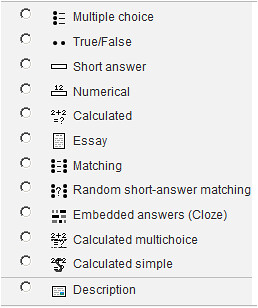
5) Calculated questions
CC Courtesy of Quiz Options by Dave Foord on Flickr
  • Moodle is constantly adding new question types. One of my favorite is the calculated classes of questions. If you teach physics, chemistry or math, you can create a problem where calculations are required. If you set up the formulae in the correct way, Moodle will create a question but use different numbers each time.


6) Timed
  • One of the glaring weaknesses of online quizzes is the need for Internet access. Unfortunately, this is a potential source of cheating. One way to help minimize the opportunity for getting help from the Internet is setting a time limit on the quiz.

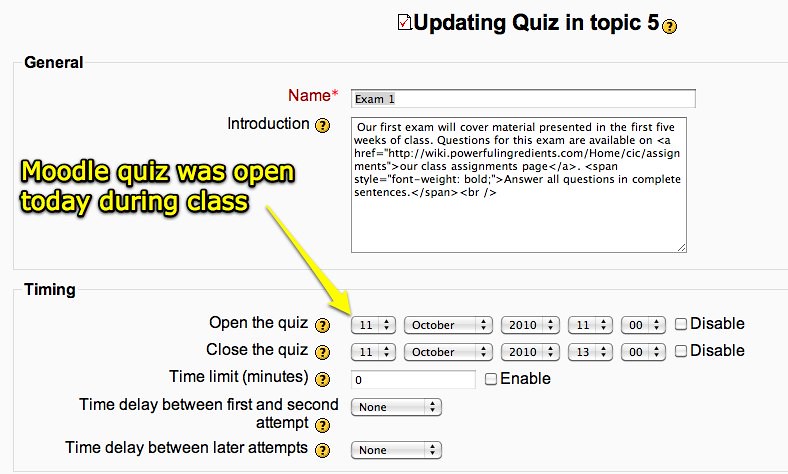
7) Open and closing of quizzes 
CC Courtesy of Moodle Quiz Open During Class by Wesley Fryer on Flickr
  • To ensure that students don't have unwanted access to your quiz, you can also set an opening and closing date for each quiz.

For more information about Moodle quizzes, try viewing the video below and visiting this link.